
You’ve spent weeks choosing products, shooting photos and setting the right prices. The store looks great. But Google Search Console shows almost no clicks on your product pages. Sound familiar? Most of the time the products aren’t the problem. Weak Shopify product SEO is.
Picture a Surat saree brand with 400 products where every page uses the supplier’s description, word for word. Hundreds of other sellers have that exact same text. Google has no reason to rank this store over them. If you’d rather have experts handle this, our Shopify SEO services cover every step in this guide. If you want to do it yourself, keep reading.
What Is Shopify Product SEO?
Shopify product SEO means optimizing each product page so it shows up when someone searches for exactly what you sell. It covers the title, URL, description, images and reviews, plus the code Google reads behind the page.
Why focus on product pages? Blogs and collection pages bring people into your store. Product pages are where the money gets made. Someone who searches “cotton kurti for office wear under 1000” already knows what they want. Your product page should be the first thing they see.
Shopify Product Page SEO: The On-Page Basics
Good Shopify product page SEO starts with fixes you can make today. None of them need any code.
Write titles people actually search
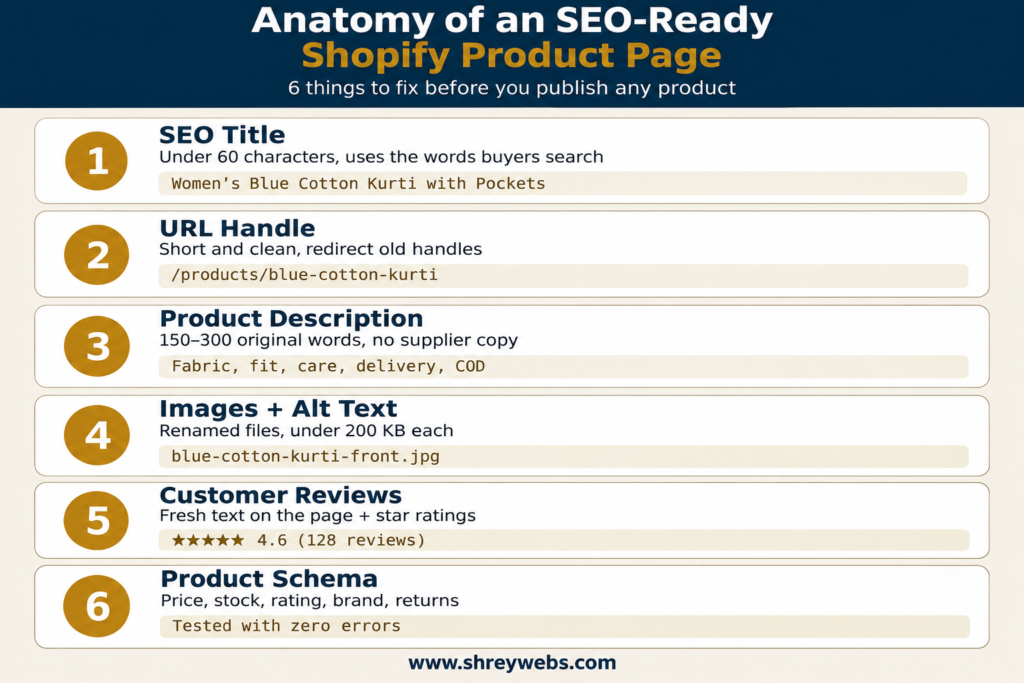
Shopify uses your product name as the page title by default. “Blue Kurti” won’t rank for anything. “Women’s Blue Cotton Kurti with Pockets, Straight Fit” will. Titles are the biggest single lever in Shopify product page SEO, and most stores ignore them.
To change the title, open the product and scroll down to Search engine listing. Keep the SEO title under 60 characters.
Clean up the URL handle
Shopify creates the URL handle from the product title. If you rename the product later, the old handle stays as it is. So you end up with something like /products/womens-blue-cotton-kurti-straight-fit-new-2. Shorten it to /products/blue-cotton-kurti.
When you change the handle, tick the “create a URL redirect” box. That way old links and Google’s index don’t break.
Write your own product descriptions
Copying the manufacturer’s text is the most common mistake on Indian stores. Of all Shopify product optimization work, rewriting descriptions gives the quickest win. Write for the buyer instead. A good description answers:
- What is the fabric or material, and how does it feel?
- Who is it for: office, festive or daily wear?
- What are the size and fit details? Link the size chart.
- How should it be washed and cared for?
- What is the delivery time, and is COD available?
- What exactly comes in the box?
Aim for 150 to 300 words on your best sellers. You don’t need this on every product on day one. Start with your top 20.
Rename and compress images
Before uploading, rename IMG_4521.jpg to blue-cotton-kurti-front.jpg. Add alt text that plainly describes the photo. Shopify converts images to WebP automatically. Even so, a 4 MB photo loads slowly on 4G in a tier-2 city. Compress product images to under 200 KB.
How Variants Affect Shopify Product SEO
One kurti in 5 colours and 4 sizes makes 20 variants. Shopify keeps all of them on one URL and adds ?variant=12345 for each one. This setup is usually good for Shopify product SEO, because all your reviews and backlinks point to a single page.
Problems start when a store creates a separate product for every colour, with descriptions that are almost identical. Google sees these as duplicates and picks one page to rank, often the wrong one.
Our rule is simple. If only the colour or size changes, keep it as a variant. If the product itself is different, like a cotton version and a silk version, make a separate page with its own description.
Schema: The Shopify Product Optimization Step Most Stores Skip
Product schema is code that tells Google the facts about your product: its name, price, stock status and rating. Google uses this data to show the price and star ratings right in search results. Those rich results get noticeably more clicks than a plain blue link. Shoppers never see this code, but it’s the part of Shopify product optimization that Google reads first.
Most Shopify themes, including Dawn, add basic product schema on their own. But “basic” is the key word here. Many themes leave out reviews, brand and return policy, and some free themes output broken code.
| Schema field | What it shows in Google | Added by most themes? |
| name, image | Product title and photo | Yes |
| offers (price, INR) | ₹ price in search results | Yes |
| availability | In stock / Out of stock | Yes |
| aggregateRating | Star rating and review count | No, needs a review app |
| brand | Brand name | Sometimes |
| hasMerchantReturnPolicy | Return details | Rarely |
| shippingDetails | Delivery cost and time | Rarely |
How to Add Shopify Product Schema Markup
There are two ways to add complete Shopify product schema markup.
Option 1: Use an app. Apps like JSON-LD for SEO or Schema Plus add the missing fields for you. This is the easiest and safest option, though it comes with a monthly fee.
Option 2: Edit the theme. Add a JSON-LD block to the main-product.liquid file. This is free, but take a backup of your theme first.
Our honest advice: if you’re not comfortable working with Liquid code, use an app. One broken snippet can wipe out your rich results completely. And if you also use a review app like Judge.me, make sure only one tool outputs the Shopify product schema markup. If two tools add it, Google gets two conflicting sets of data and may ignore both.
Schema is only one part of the technical side. For sitemaps, canonicals, site speed and collection pages, read our guide on Shopify SEO optimization strategies.
How to Test Your Shopify Product Structured Data
Once the schema is live, don’t just assume it’s working. Test your Shopify product structured data:
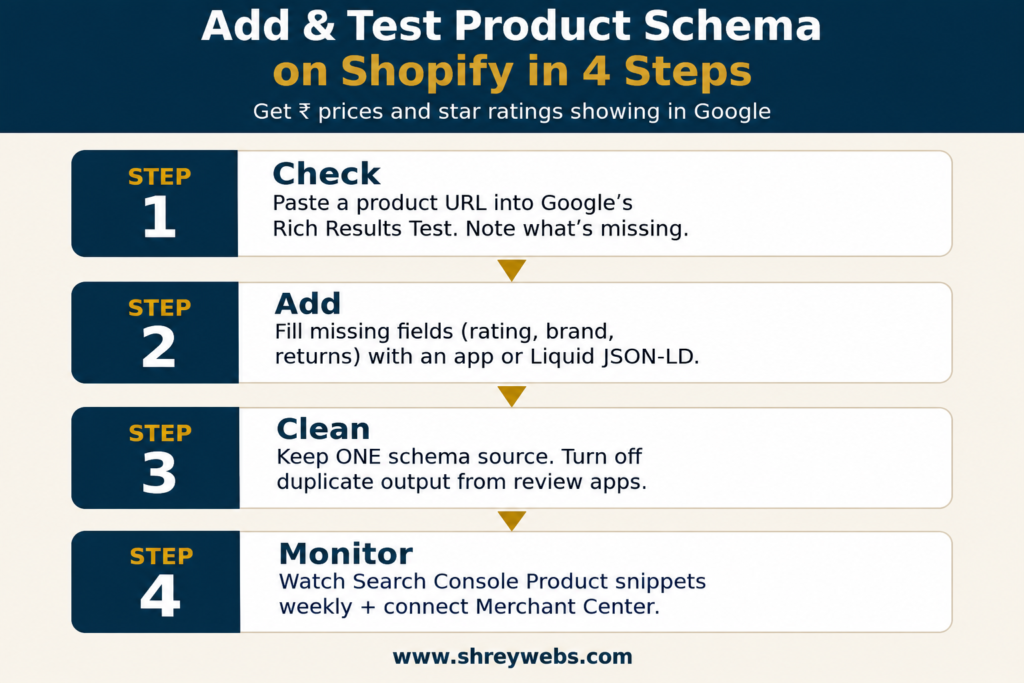
- Open Google’s Rich Results Test and paste in a product URL.
- Check that “Product snippets” and “Merchant listings” show as valid.
- Fix the red errors first, such as a missing price or invalid availability. Yellow warnings are optional, but worth fixing.
- In Search Console, check the Product snippets report every week for a month.
Clean Shopify product structured data has another benefit. Through Google Merchant Center, your products can appear in Google’s free Shopping listings. That’s extra traffic you don’t pay for.
Quick Shopify Product SEO Checklist
Run every new product through this list before you publish it:
- SEO title under 60 characters, with the term buyers actually search
- Short, clean URL handle
- Original 150 to 300 word description
- Renamed, compressed images with alt text
- Reviews visible on the page
- Schema tested in Rich Results Test, with zero errors
- Product linked from at least one collection and one blog post
Product pages are only one part of growing your store. For the bigger picture of how online stores improve their Google visibility and customer reach, read our full guide.
Final Thoughts
You don’t need to fix 500 products this week. Pick your top 20 sellers. Rewrite their titles and descriptions, test the schema, then watch Search Console for a month. Shopify product SEO is slow, steady work, but every page you fix keeps bringing in buyers for years.
Want an expert to check your store? Book a free Shopify SEO audit with ShreyWebs.
FAQs
1. How long do product pages take to rank on Google?
For most stores, it takes 6 to 12 weeks after the changes go live. New stores with no backlinks can take longer. Start with the products that already get some impressions in Search Console, because they move fastest.
2. Does Shopify add product schema automatically?
Yes, most themes add basic schema. But it often leaves out reviews, brand and return policy. Test one product URL in the Rich Results Test and you’ll see exactly what’s missing.
3. Should I write a new description for every variant?
No. Variants share one page, so one strong description is enough. Mention the available colours and sizes inside that description.
4. Can I use AI to write product descriptions?
You can use AI for a first draft. But add the real details yourself: fabric feel, fit, and the questions customers actually ask. Google rewards pages that help buyers, not pages that just repeat the same text.
5. Do product reviews help SEO?
Yes. Reviews add fresh, original text to the page, they enable star ratings in search results, and they build trust before checkout. Ask every buyer for a review 7 to 10 days after delivery.